Company

Do you sell on Shopify? Then you're closer to a live 3D product page than you think.
Most 3D product integrations start with a ticket in your dev team's backlog. This one starts with an app install.
Epigraph Solutions is now available directly in the Shopify App Store. It's built so a merchandiser or marketer, not an engineer, can go from zero to a live 3D product experience in one sitting. That's true because of how Epigraph built the app, and because of how Shopify built the platform underneath it.
Shopify's theme editor and app block architecture were designed for exactly this kind of merchant-led setup. Apps like Epigraph plug into the same drag-and-drop system merchants already use for reviews, upsells, and other on-page content, so there's no separate integration layer to maintain.
That matters beyond 3D. It's part of why Shopify has become the default platform for growing brands that don't want every storefront change to require an engineering sprint. If you're already running your store there, the infrastructure for a fast 3D rollout is already in place. You're just turning it on.
It's a native Shopify app that adds interactive 3D and AR directly into your theme editor. Once installed, Epigraph shows up as a set of app blocks you can drag onto any product page, the same way you'd add any other Shopify section.
No custom theme code. No developer handoff. Your existing theme, with 3D built in.
No custom theme code. No developer handoff. Your existing theme, with 3D built in.
Three steps, start to finish:
1. Go to `apps.shopify.com/epigraph-solutions` and click install.
2. Approve the app for your store.
3. You'll land on a short setup guide covering best practices before you touch your theme.
From there, Epigraph shows up in your Shopify admin like any other installed app, ready to use.
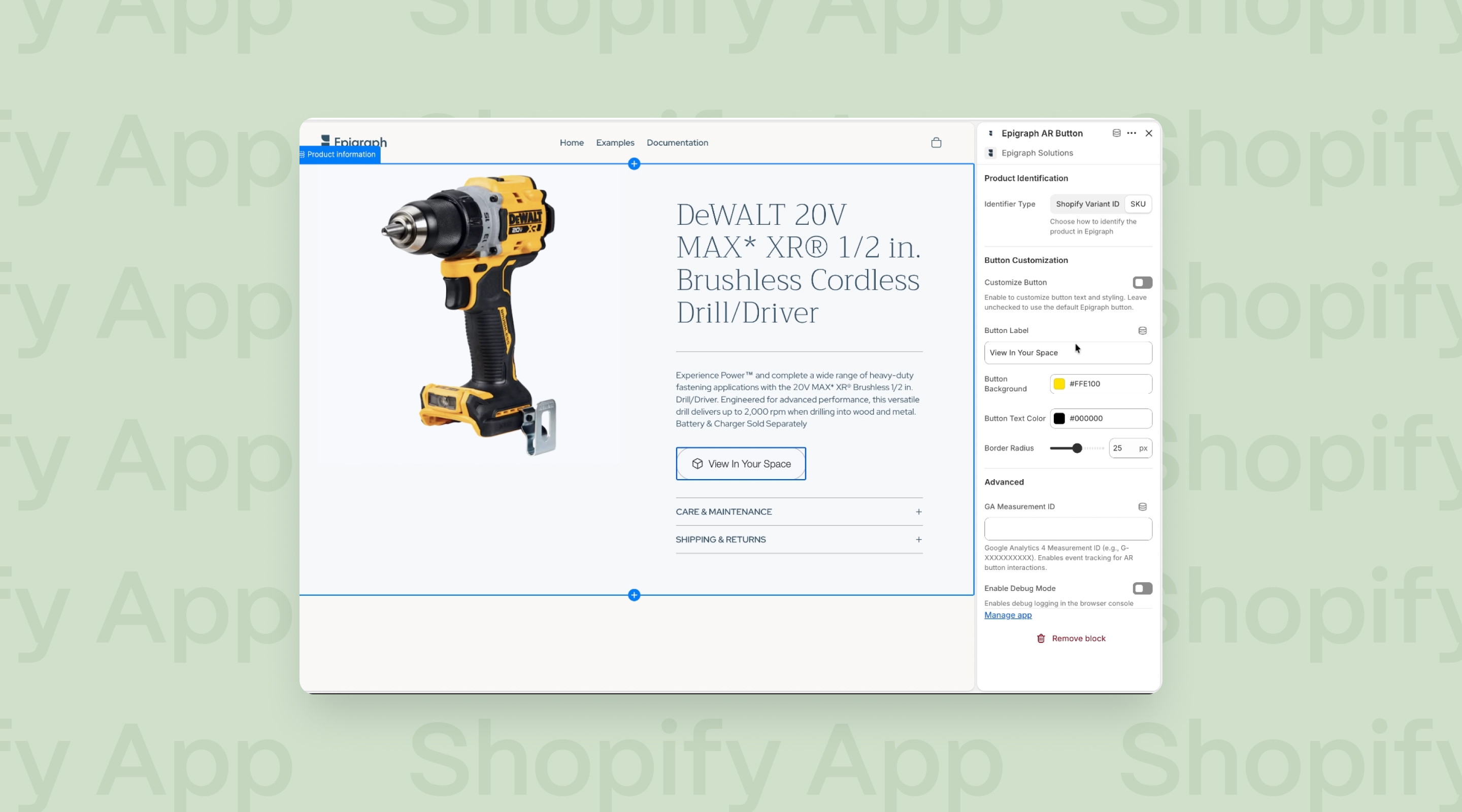
Open your theme editor, navigate to a product page, and add a block. Epigraph offers two:
Epigraph Button. A call-to-action that opens your 3D viewer, with a QR code for shoppers who want to view the product in their own space via AR. Drag it anywhere on the page, above the description, below it, wherever it earns its spot.
Epigraph Tour. The full interactive experience: a spinnable, zoomable 3D model with hotspots that walk shoppers through features and details, the same Product Tour format Epigraph builds for brands like DeWalt and SunHome Saunas.
Both are theme blocks. Add one, position it, save. That's the whole workflow.
Shopify variants and your product catalog don't always line up one to one. A product might have a Shopify variant ID that doesn't match how it's modeled in 3D, or you might be managing 3D content at the SKU level across a broader catalog.
Epigraph's app blocks support both. If your Shopify variant ID doesn't resolve to a model, switch the block's binding to SKU instead. The 3D content loads against your SKU, not the storefront's variant structure, so your catalog logic doesn't have to bend to match the app.
It's a small setting, but it's the difference between "the block just spins and never loads" and a product page that works on the first try.
Yes, and it's a menu, not a code edit. From the Customize Button panel, you can adjust colors, styling, and behavior to match your brand, right down to matching a specific product line's palette. You can also toggle the button off entirely for products where it doesn't apply.
The 3D Tour block has its own controls: width and height (anything CSS accepts), a separate mobile width and height, and the breakpoint where mobile display takes over. You can set a transparent background, and choose whether hotspots show immediately or stay hidden until a shopper wants to dig deeper.
Yes, by design, not as an afterthought. Mobile and desktop each get their own layout: desktop typically shows more of the supporting hotspot menu alongside the model, while mobile adapts to the smaller screen without losing the core interaction. You control exactly where that switch happens with the mobile breakpoint setting.
Given how much high-consideration shopping now happens on a phone, that adaptability isn't optional.
Yes. Both the button and the 3D Tour block support Google Analytics measurement IDs. Add yours, and the app fires standard visualization engagement events to your existing GA setup. Your analytics team keeps working in the tool they already use, no separate dashboard required.
(Analytics configuration itself is a separate step. Ask your Epigraph contact for a setup guide if you need one.)
The mechanism is the same one behind every Epigraph deployment: shoppers who can see, rotate, and understand a product before checkout buy with more confidence and second-guess less after delivery. Brands using Epigraph's interactive 3D see an average 135% lift on conversions and 38% fewer returns. The Shopify app doesn't change that math, it just removes the development timeline that used to stand between a brand and turning it on.
Mid-market Shopify brands without a dedicated development team are the clearest fit, especially in categories where features and finishes are hard to communicate through static photos: outdoor power equipment, wellness and home spa, furniture, and fitness. If your product page is trying to explain something a photo grid can't, and you're already on Shopify, this is the fastest path to fixing that. Brands still weighing platforms can take it as one more point in Shopify's favor: the ecosystem is built so upgrades like this one don't require a re-platform.
Install the app, add a block, publish. If you already have 3D content with Epigraph, connecting it to your Shopify PDP is a same-day task. If you don't yet, [book a free demo](#) and we'll show you what a live 3D Tour looks like on a product in your catalog, and what it takes to get there.
The barrier to interactive 3D on Shopify used to be engineering time. Now it's a theme block. Install the app, drag it onto a product page, publish, and your shoppers are spinning, customizing, and exploring the product in minutes.
If you sell on Shopify, that's the whole story: the platform gives you the foundation, and Epigraph gives you the 3D.
Ready to see it live? Book a free demo and we'll walk you through the setup on a product from your own catalog.